Subcribe to our RSS feeds Join Us on Facebook Follow us on Twitter Add to Circles

Thursday, 1 May 2014

[APK Teardown] Google Search 3.4 Hints At Timer Integration, Cards For Your Friends' Photos, And Much More Posted by Cody Toombs in Android OS, APK Teardown, Applications, Google

See Your Friend's Photos

The content of Google Now tends to focus heavily on your current or future location, and as a close second, it tries to be helpful with reminders about TV shows and events. What it hasn't really done is hook into the events generated by your friends. A new layout and some new strings indicate that we're about to see cards generated from the pictures shared to Google+ by our friends.
Judging by the name of the layout, friend_location_photos_card, it still seems to be tied to a location. Perhaps this will only appear when you're traveling to or searching for information about a place where friends have taken photos. The layout is pretty straight forward with a title at the top, a grid of photos or a single image, another string of text to identify the origin. At the bottom of the card will be a +1 button and a button to send an email.
<string name="friend_location_photos_title">"%1$s's photos of %2$s"</string>
<string name="friend_photos_source">%1$s shared these photos on Google+</string>
<string name="contact_google_plus">%1$s on Google+</string>
We haven't seen these cards appear yet, but there is plenty of code to back them up. We're probably just waiting for Google to flip the switch to turn these on.

Real Timer Integration

Setting a timer isn't exactly new feature, but Google Now has never really done it right. Instead of setting a proper timer with precision down to the second, it creates an alarm, which may be inaccurate and can even incorrectly set itself to go off the following day. A set of new strings suggest Google Now is going to finally fix this bug with proper integration with timers.
<string name="action_set_timer_duration">Duration:</string>
<string name="action_set_timer">Set timer</string>
<string name="action_set_timer_set_a_duration">add a time</string>
<string name="action_view_timers">View timers</string>
<string name="action_timer_canceled_title">Timer canceled</string>
<string name="action_timer_canceled_tts">Timer canceled</string>
<string name="set_timer_submit">Start timer</string>
<string name="timer_app_not_available">No apps able to set timer</string>
These strings are appearing in code, but attempting to set a timer still fires up an alarm, so this doesn't seem to be working yet. With each release, we keep hoping this will start working the way it's supposed to. Fingers crossed!

More Info About Our Travel Reservations

Based on a few of the strings here, it looks like we're about to get more data about our reservations on different modes of travel. Some new layouts and strings indicate we're going to see reservation numbers, cities we're traveling between, the boarding platform, and the type and number of seats. Judging by the layouts, this is also going to show multiple legs of a journey.
New layouts:
  • transportation_card_row
  • transportation_info_multiple
  • transportation_info_row
  • transportation_info_single
  • transportation_single_card
<string name="city_to_city">%1$s to %2$s</string>
<string name="transportation_coach">Coach</string>
<string name="transportation_platform">Platform</string>
<string name="transportation_class">Class</string>
<string name="transportation_passenger">Passenger</string>
<string name="transportation_reservation_number">Reservation #</string>
<string name="transportation_time_zone">(%1$s)</string>
<plurals name="transportation_seat">
<item quantity="other">%1$d Seats</item>
<item quantity="one">Seat</item>
</plurals>

More Info For Sporting Events

Matching the momentum on travel details, sporting events are about to get more elaborate content thanks to a pair of new layouts named sport_event_versus_list_row.xml and sport_event_versus_details_card.xml. These appear to be extensions of the existing sporting events cards, so there really isn't a lot of new information to add. The rows will simply show a title, the team logos, game status, and scores. The full-size detail card repeats the same information, but adds team names and a histogram.
There's no sign that these cards are showing up yet, they look ready to go when Google decides it's time.

Nearby Products Card

It looks like Google's Shopping engine is about to get a card of its own. A new layout just turned up with the name nearby_product_card_row. It is just a row, so it only contains the product name, price, and a photo. It's possible that these will be displayed as search results instead of loading up the generic Google shopping results web view. And the name obviously indicates this feature is meant to help people find the most accessible options for purchasing a particular product.
Hints of this particular feature also turned up in the Glass XE 16 teardown in the form of a new iconand in the list of built-in voice commands, so it's likely to make a debut fairly soon. Unfortunately, there is only the one layout and almost no helpful code, so there isn't much more to say on this.

Music Controls Directly In Google Now

In part 2 of the Glass teardown for XE 16, I discovered Glass was about to receive some much needed voice controls for music apps. It looks like Google Now is going to receive similar treatment, although, without the actual voice commands. We're going to have a card containing media controls, most likely appearing anytime a music app is playing in the background. There aren't a lot of strings to look at, but there is a media_control_card layout and plenty of code to support this. I've run Play Music to try to activate the card, but it never turned up. It's probably scheduled to go live in a future update.
<string name="media_control_name">Action</string>
<string name="music_control_prompt">Controlling music</string>

Settings For Hotword Detection

Hotword detection is certainly an awesome feature, but some have complained that they would like a little more control over it. That might explain the next couple of strings that we'll probably see sometime in the future.
<string name="hotword_charging_pref_title">Listen while charging</string>
<string name="hotword_screen_on_pref_title">Listen if the device is unlocked</string>
It seems we'll gain the ability to choose if listening should occur when the device is charging and when the device is unlocked. Ok, I agree, that sounds exactly like the times it should be operating, so maybe these preferences will allow for disabling hotword detection under those circumstances.
REMOTE_ACCESS And REMOTE_SEARCH_ACCESS Permissions
This one is a little more mysterious. For a while now, Search has had a permission calledcom.google.android.apps.now.REMOTE_ACCESS, and its protection level was set to "signature". That meant only other apps signed by Google were able to access that permission. With this update, the protection level has changed to "normal" and presumably allows any app to use the APIs guarded by that restriction, assuming they add that permission to their manifest. This particular permission is described as "Remote access to your data in Google Now."
<permission android:description="@string/permission_remote_access_desc" android:label="@string/permission_remote_access_label" android:name="com.google.android.apps.now.REMOTE_ACCESS" android:protectionLevel="normal"/>
Along with this minor change, a new permission for REMOTE_SEARCH_ACCESS and a related service were also added.
<string name="permission_remote_search_access_label">Google Search remote access</string>
<string name="permission_remote_search_access_desc">Remote access to Google Search results.</string>
<service android:label="@string/serviceLabel" android:name="com.google.android.remotesearch.RemoteSearchService" android:permission="com.google.android.remotesearch.REMOTE_SEARCH_ACCESS" android:process=":search">
<intent-filter>
<action android:name="com.google.android.remotesearch.IRemoteSearchService"/>
<category android:name="android.intent.category.DEFAULT"/>
<data android:mimeType="audio/l16"/>
</intent-filter>
</service>
<permission android:description="@string/permission_remote_search_access_desc" android:label="@string/permission_remote_search_access_label" android:name="com.google.android.remotesearch.REMOTE_SEARCH_ACCESS" android:protectionLevel="normal"/>
<uses-permission android:name="com.google.android.remotesearch.REMOTE_SEARCH_ACCESS"/>

It's not clear if this means other a

Use Both Data And WiFi For Boost Internet Speed

If you are here then you may be boost up with your internet speed on your mobile.You may find it easy to use internet on mobile by connecting to your home or business WiFi for faster access well, as human mentality every one wants more and more speed while using internet .If you are one of this type then you are at right place. Here today i am going to introduce you to the app that may assist you to use your net pack and WiFi at a same time for quicker net. Although,at least once while using internet you might have a question that can i use packet data and WiFi at same time.Generally it is not possible because as soon as you turn on you WiFi your packet data got disconnected. and now here at i am going to introduce you to one such apps that will help you to do use packet data and WiFi at same time So now without wasting way more time lets come back on this superb however useful trick.

Use Both Packet Data And WiFi For Boost Internet Speed :


Requirements:

1. Rooted android device of version 2.2 or higher
2. WiFi and Packet Data available at same time
3. Need to Donload "Super Download" App for Android [Paid Version Link] [Free Version Link]

Just click on download link and if this application recognize your it , it will start downloading that thing itself, but if this method doesn't work then click and hold the link and then from the menu that will appear click on "Share with" and then choose SuperDownload. Finally you can copy and then pasteURL In "Add URL" Dialog  and you can can set to speed up your download.

Some Instructions:

  • Using Both of the networks, packet data and WiFi require root access in your android. And also remember to say "authorize" to the superuser prompt.
  • As you are using WiFi along with your packet data ,  you may incur in additional charges from your network operator for using packet data only.
  • To make the software use it's full power , this software requires good  and balanced WiFi And mobile packet data without any dis connectivity.
  • If you are having good WiFi, still you need 3G or 4G network to make software to work at it's fullest 
  • Using Both connections is not supported by some devices 
  • Some web server may not provide to much downloading speed as will your packet data and wifi will give simultaneously.
  • Currently only http and https protocols are supported (no ftp or torrent yet)
  • The Lite version or free one  has a file-size limit of 50 megabytes.

Install KitKat 4.4 on Android

Hello Everyone, in this article i'm talking about how to install kitkat 4.4 on android devices with
CyanogenMod 11CyanogenMod is an open source operating system for smartphones and tablet computers, based on the Android mobile platform. It is developed as free and open source software based on the official releases of Android by Google, with added original and third-party code. CyanogenMod releases are provided on a nightly, milestone, and "stable version" schedule. I've been running CM 11(kitkat 4.4) for a couple of months now and have been very impressed. Now, you can get the same KitKat (CM 11) experience on the aging but still wonderful . Here's how to do it.

Install KitKat 4.4 on Android:


Warning:

The installation of custom ROMs is risky, so if you do not follow the procedure properly, you can end up with an unusable phone. Back up all your data first, charge your battery and proceed with caution. Neither "HelperTricks Team" nor myself will be held responsible for any damage done to your phone as a result of this process.
Must Check : Top Best Keyboard Apps For Android

Requirements:

  • Rooted Android Phone (If you're not rooted and are unsure how to root your android, check these root tutorial.)
  • Nandroid backup of your system
  • You should also backup your app data too as this process will wipe your device.

Downloads:

Download the latest CM 11 for your Android Device form Official Site of CyanogenMod. As always, there's nothing preventing you from flashing a newer version, once it is available.

Also download the Google applications package for KitKat: gapps-kk

Install KitKat 4.4 on Android with CM 11:


Since your device is rooted, we will use the good old custom recovery method. As a reminder, here is the procedure:

1. Download both zip files given above on your android device.

2. Place both files in the root directory of your android device.

3. Turn off the android device and restart in Recovery Mode (for samsung-> Home + Power + Volume Up until the logo appears or the third vibration and release & for other android devices-> use google to find how to open recovery mod or clockworkmod for any android device).

4. Perform a factory reset by selecting and confirming the option "Wipe Data/Factory Reset" then "Wipe Cache". Some users prefer to ''Format System'' / ''Wipe Dalvik Cache'' at this point too.

5. Then select "install zip from sd card" and locate the CM 11 zip you downloaded before.

6. Click "Yes" to confirm.

7. Next, flash the gapps zip file.

8. Return to the main Recovery Menu and select "Reboot System Now".

The first reboot on CM 11 may take a few minutes. Let us know how you like it!

If you face any problem feel free discuss in below comments

How To Install iOS On Android

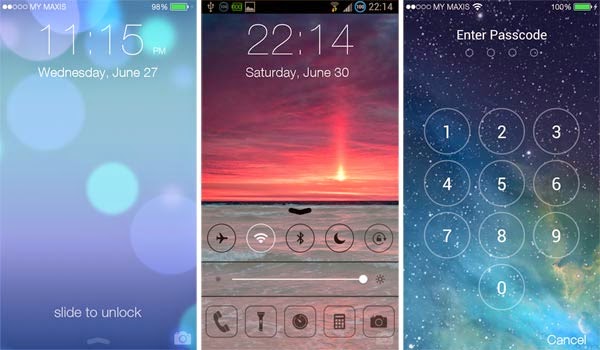
Everybody has craze about iPhone, iOS. Some People can't afford this costly product. So, as everybody knows that android is getting popular day by day due to it's customization. So, if you are android user who want to change his android into iOS 7 then you are at right place. We are not here porting system files to make transform android into iOS. I am simply going to tell you the best apps, launchers to covert you smart android into iOS. 

How To Install iOS On Android :

1. Espier Launcher 7

Espier Launcher 7 is the flat-style edition of the best and the most popular Apple style home screen app for Android devices. In this edition, you can experience the perfect Android implementation of Apple's flat style font, layout, search page, and animations. Now, you can feel the simplicity on your Android devices.


Features From Play Store :

  •  Flat-style.
  •  Dozens switches or options, which help the launcher matches your Android device perfectly.
  •  Unique multi-language support; Dozens languages supported, and more and more.
  •  Design icon by yourself.
  •  Dozens of themes.

2. iOS 7 Lockscreen Parallax HD


The is simple lock screen of iOS 7 can be had on your Android with this app, you get the flat style lock screen with the parallax effect to boot, the camera launcher, sliding to unlock and passcode. This locker updated with the latest lock screen security. This app will lock your screen with two different layers of securities.

3. Espier Notifications 7

Espier Notifications 7 is a flat style personalized status bar, notification page, and notification management plugin for Espier Launcher 7. Espier Notifications 7 can help you to manage the notifications sent by apps to the status bar or the notification page. It can make your status bar and notification page clear and uniform, and enhance the visual effects of your Android device's notification display. 


Features From Play Store :

  • The clear status bar and the notification page in flat style.
  • Three tabs in the notification page: Tody, All, and Unread.
  • Merge multiple notifications of an application into one intelligently.
  • Use Notification Center to effectively manage which notifications can be displayed and how.
  • Several customization options.

4. Control Center 7

Espier Control Center 7 is a plugin for Espier Launcher 7 (or Espier Launcher). This app can help you to rapidly control the system functions such as Airplane Mode, WiFi, Wireless, Bluetooth, and so on. It can also help you to quick launch some tool apps, such as flashlight, clock, calculator, and camera. 


Features From Play Store :

  •  The control center in Apple's flat style.
  • Rapidly control system functions, such as Airplane Mode, WiFi, Wireless, Bluetooth, and so on.
  • Quick launch the frequently used apps, such as flashlight, clock, calculator and camera.
  • Control music player and sound volume by setting a 4x1 or 5x1 widget.
  • Several customization options.

5. Espier Dialer 7

Espier Dialer 7 is the best dialer and contacts app for Android phone in Apple's flat style. This app allows you to experience the contacts management and the call management in Apple's flat style on your Android mobile phone.

Features From Play Store :


  • Apple's flat style user interfaces, simple and practical.
  • Favorites management helps you to manage your frequent contacts.
  • Easily manage the call log ordered by all and missed.
  • Alphabetical list of contacts helps you locate your contact easily.
  • Dial Pad provides support for T9 intelligent matching 

6.  Other Apps 

  • Boot Animation                            [ Download ]
  • Currency Converter App              [ Download ]
  • iLauncher                                     [ Download ]
  • iNoty                                           [ Download ] 
  • iOS 7 Browser                             [ Download ]
  • iOS 7 Calculator                          [ Download ]
  • iOS7 Memo                                 [ Download ]
  • iOS Gallery                                  [ Download ]
  • A.I.type Keyboard                       [ Download ]
  • iOS 7 Music                                 [ Download ]      

NOTE : First of all download and install very thing on your android mobile. Then click your Home Button A little Pop-up will come which will show which launcher. Select  Espier Launcher 7 and select Always.

So, by using above apps you can transform your android into iOS 7 running device. I hope this helped you a lot. If you are facing any problem just comment it below. Feel free to share. Thanks !! 

Move Audio Move S - Unboxing & Review!

Nude audio, move s, portable speaker, review
In a crowded world of portable speakers, there are certainly a ton of music players to choose from! Ther are cheap ones, wallet-burning ones, good-sound ones and those with lousy audio. Today, My Android Daily will take a close look at Nude Audio's Move S and see if this is the portable speaker for your ears!


#1 Exterior!

Nude audio, move s, portable speaker, review

With countless of small portable speakers on the shelves of departmental stores, we feel that the Move S is one of most eye-catching speaker around. It has circular grills made of a nice solid plastic while its sides are made of rubber which is able to withstand soft knocks.

Nude audio, move s, portable speaker, review
Micro-USB & 3.5mm audio output

The part of the speaker that makes it stand out has to be the cute strap which is not only visually beautiful but also handy as well!

In terms of the button, we’ve got the power button, the volume controls and the bluetooth indicator. (See above)

On the other side, we got the micro-USB for charging purposes and a 3.5mm output for daisy-chaining the Move S to other Speakers. (See Right)

Overall, we’ve got to say that we are pleased with the exterior of the Move S. A portable speaker is something that you will bring around and hence you would certainly want it to be light compact and attractive. Now that the speaker has scored well in the design aspect, let’s see how do we connect it to our Smartphones or computers.

#2 Connectivity

Nude audio, move s, portable speaker, review
The Move S connects to your smartphone or computer via Bluetooth. How it works is simple. First, turn on the speaker and you will notice a blue blinking light. That means the speaker’s bluetooth is ready for connection. 

It connects via Bluetooth!
Now, turn on the bluetooth on your smartphone and it should be able to detect the Move S. Simply select the speaker and you are ready! (See left). Easy huh? Now, any audio that is played on your smartphone would be played instead on the speaker. After many hours of playing the Move S, we realised that the speaker has a rather reliable built-in Bluetooth but occasionally it experiences a lost of conectivity.


#3 Audio Quality

Nude audio, move s, portable speaker, review, bluetooth
The most important aspect of any audio gadget is its sound quality. Well, we have to say that the sound coming of the speaker is pleasing to the ears.

Sure, it isn’t the best sounding portable speaker out there but for its size and price, it rather impressive. You’ll be able to turn up the volume that will easily fill up a room and not get any major audio distortions. The only down-side to this speaker is the lack of bass and as mentioned before, it ain’t the best sounding gadget. Still, for its compact design and affordable price tag, it’s an amazing speaker to have.

Conclusion.

So there you have it guys, this has been our unboxing and review of the Nude Audio Move S. We have been pleased with its gorgeous design, above-average sound quality and not to mention its battery life which lasts almost 7 hours on a single charge. The only fault we can come up is the almost non-existent bass. Other than that, the speaker has put smiles on our faces whenever we turned it on.

The largely unproven patents behind the Apple v. Samsung dispute


The world’s largest mobile device makers accused each other of infringing patents for their devices. Worth noting: These patents haven't passed legal muster in the past.


apple-iphone-slide-to-unlock-5853.jpg
Apple has accused Samsung of infringing on its patent for slide-to-unlock.

SAN JOSE, Calif. -- Apple and Samsung on Tuesday made their final pitches to a jury, arguing why they believe their rival infringed their smartphone and tablet patents. Now the question is who's going to win?
While jury trials are tought to predict, precedence with the patents being debated in this case makes it difficult for even the experts to call.
Lex Machina, a Silicon Valley startup that crunches data to help companies such as Qualcomm and Hewlett-Packard change the way they approach patent lawsuits and licensing, shared historical data about the patents asserted by Apple and Samsung.
Neither of the two Samsung patents at issue -- which the Korean electronics maker acquired in 2011 -- have ever been asserted in federal court, according to Lex Machina. And only one of Apple's four patents, known as '647 or quick links, has been extensively tested. So far, Apple has asserted that patent in seven other cases (four against Motorola, two against Nokia, and one against HTC).
However, only one case involving '647 has ever gone to a ruling, and that didn't end in Apple's favor.
That particular suit, against Motorola, was dismissed by Judge Richard Posner of US District Court for the Northern District of Illinois in a summary judgment in 2012. Posner cited a lack of evidence for either company to prove its case and dismissed all claims. He also formed a certain interpretation of the '647 patent that limited Apple's claims and resulted in much lower royalties demanded from Motorola than what Apple is asking from Samsung. (Apple wanted 60 cents per Motorola device deemed to violate its patent versus $12.49 per Samsung unit.)
An appeals court last week threw out Posner's judgment, allowing the case to proceed. At the same time, the court upheld Posner's interpretation of the '647 patent. It's unclear what will happen in the ongoing suit.
As for Apple's other patents, two of the four others -- '721 for slide-to-unlock and '172 for predictive text -- were asserted in cases against Motorola and HTC , Lex Machina said. Apple and HTC settled all of their patent disputes in late 2012. The other two patents haven't be asserted in any cases, Lex Machina said.

apple-1.jpg
In 2013, Apple faced 60 patent cases as defendant.Lex Machina

While patent history may not be a good guide for predicting the trial's outcome, the other jury trials between the tech giants may offer a stronger hint how the current case will turn out -- maybe.
"Juries tend to vote slightly emotionally in the sense that if you're expecting the jury to analyze and retain every technical point, every detail, every argument that was presented in the case, that's really not how it happens in the real world," said Pierre R. Yanney, a patent attorney and partner at Stroock & Stroock & Lavan. "It's really hard to tell which way it would go at this point."
Apple didn't respond to requests for comment for this story, and Samsung declined to comment.
Apple initially filed suit against Samsung in April 2011, accusing its rival of copying the look and feel of its iPhones and iPads. Samsung countersued, and the case went to trial in August 2012. A nine-person jury sided with Apple on a majority of its patent-infringement claims against Samsung. It awarded Apple $1.05 billion in damages, much less than the $2.75 billion sought by the Cupertino, Calif., company. Samsung, which asked for $421 million in its countersuit, didn't get anything.
However, US District Court Judge Lucy Koh, who is overseeing the current trial in San Jose, Calif., in March 2013 ordered a new trial to recalculate some of the damages in the case, striking $450.5 million off the original judgment against Samsung. A jury in November awarded Apple an additional $290.5 million in damages, bringing the total damages to $930 million.
So far, Apple is 2-for-2 in its jury trials versus Samsung. Stay tuned to CNET to find out whether that becomes 3-for-3 or whether Samsung prevails. A jury verdict could be delivered this week.
Almost two years after Apple and Samsung faced off in the earlier, messy patent dispute, the smartphone and tablet rivals returned to the same courtroom in San Jose to argue once again over patents before Judge Koh. Apple argued that Samsung infringed on five of its patents for the iPhone, its biggest moneymaker, and that Apple is due $2.2 billion for that infringement. Samsung wants about $6.2 million from Apple for infringing two of its software patents, and it argued that if it did infringe all of Apple's patents, it should only have to pay $38.4 million.
While the companies are asking for damages, the case is about more than money. What's really at stake is the market for mobile devices. Apple now gets two-thirds of its sales from the iPhone and iPad; South Korea-based Samsung is the world's largest maker of smartphones; and both want to keep dominating the market. So far, Apple is ahead when it comes to litigation in the US. Samsung has been ordered to pay the company about $930 million in damages.
Most Samsung features that Apple says infringe are items that are a part of Android, Google's mobile operating system that powers Samsung's devices. All patents except one, called "slide to unlock," are built into Android, Samsung said. Apple argued the patent-infringement trial has nothing to do with Android. However, Samsung called Apple's suit an "attack on Android" and said Google had invented certain features before Apple patented them. It came out during the trial that Google has been helping Samsung fund its defense against a couple of Apple's patent claims because of a "Mobile Application Distribution Agreement" for Samsung to use Google's apps.
There are seven patents at issue in the latest case -- five held by Apple and two by Samsung. Apple accused Samsung of infringing US patents Nos. 5,946,647; 6,847,959; 7,761,414; 8,046,721; and 8,074,172. All relate to software features, such as "quick links" for '647, universal search for '959, background syncing for '414, slide-to-unlock for '721, and automatic word correction for '172. Overall, Apple argued that the patents enable ease of use and make a user interface more engaging.
Samsung, meanwhile, accused Apple of infringing US patents Nos. 6,226,449 and 5,579,239. The '449 patent, which Samsung purchased from Hitachi, involves camera and folder organization functionality. The '239 patent, which Samsung also acquired, covers video transmission functionality and could have implications for Apple's use of FaceTime.
The Samsung gadgets that Apple said infringe are the Admire, Galaxy NexusGalaxy Note, Galaxy Note 2, Galaxy S2, Galaxy S2 Epic 4G Touch, Galaxy S2 Skyrocket, Galaxy S3, Galaxy Tab 2 10.1, and the Stratosphere. Samsung, meanwhile, said the iPhone 4iPhone 4SiPhone 5, iPod Touch (fifth generation) and iPod Touch (fourth generation) all infringe. It initially accused the iPad 2iPad 3, iPad 4, and iPad Mini of infringing its '239 patent, but it later dropped those claims. That also reduced the amount Samsung wanted in damages to $6.2 million from its originally requested $6.8 million.
Following the conclusion of closing arguments shortly before 3 p.m. Tuesday, the case was handed to the jury of four men and four women. The jury -- made of tech novices, including a police officer and a retired teacher who likes salsa dancing -- will deliberate every business day until it has a verdict.